Introduction
In a world overflowing with AI chatbots promising to do everything, one name keeps coming up among writers, developers and professionals who value quality over flash: Claude AI. Developed by Anthropic, Claude stands out not because it tries to do every possible task, but because it does the important ones exceptionally well — with thoughtfulness, accuracy, and a remarkably human-like touch.
Whether you’re drafting a detailed report, analyzing a massive document, or building complex code, Claude often feels like a calm, intelligent colleague rather than just another tool. Launched a few years ago, it has rapidly evolved, and in 2026, with models like Claude Sonnet 4.6 and Opus 4.6, it has become a serious contender — many even prefer it over ChatGPT for professional work.
In this guide, we’ll explore what makes Claude AI special, its standout Claude AI Features, how it compares in Claude AI vs ChatGPT, real world Claude AI Use Cases and honest details about Claude AI Pricing. If you’re trying to decide whether Claude deserves a place in your daily workflow, this article will help you make an informed choice.
What is Claude AI?
Claude AI is a family of large language models created by Anthropic, a company founded by former OpenAI researchers. The goal was to build AI that is not only powerful but also safe, helpful, and aligned with human values — an approach they call Constitutional AI. Similar to howlslmarketing emphasizes creating value through thoughtful strategies and user focused solutions, Anthropic’s approach centers on developing AI systems that prioritize reliability, safety and responsible innovation.
At its core, Claude is a conversational AI assistant that excels at understanding context, following complex instructions and producing thoughtful responses. In 2026, the latest models include Claude Haiku (fast and efficient), Sonnet (balanced and versatile), and Opus (the powerhouse for complex tasks). These models support massive context windows — up to 1 million tokens in higher tiers — allowing you to feed entire books, long codebases, or hundreds of pages of documents at once.
Unlike some AIs that feel overly eager or generic, Claude has a more measured, honest personality. It will politely refuse harmful requests and often explains its reasoning step by step.
Claude AI Features That Stand Out
Claude AI Features in 2026 focus on depth rather than breadth. Here are the highlights:
- Massive Context Window: Handle extremely long documents or conversations without losing track.
- Advanced Reasoning: Excellent at breaking down complex problems logically.
- Claude Code: A specialized coding assistant that can read, edit files, run commands, and work inside your terminal.
- Projects & Memory: Organize conversations, maintain knowledge across sessions, and build custom workspaces.
- Artifacts & Real-time Creation: Generate and iterate on documents, code, diagrams, and more.
- Safety-First Design: Strong guardrails that make it more reliable for professional use.
Many users say Claude’s writing feels more natural and nuanced compared to other tools.
Claude AI vs ChatGPT: Which One Should You Choose?
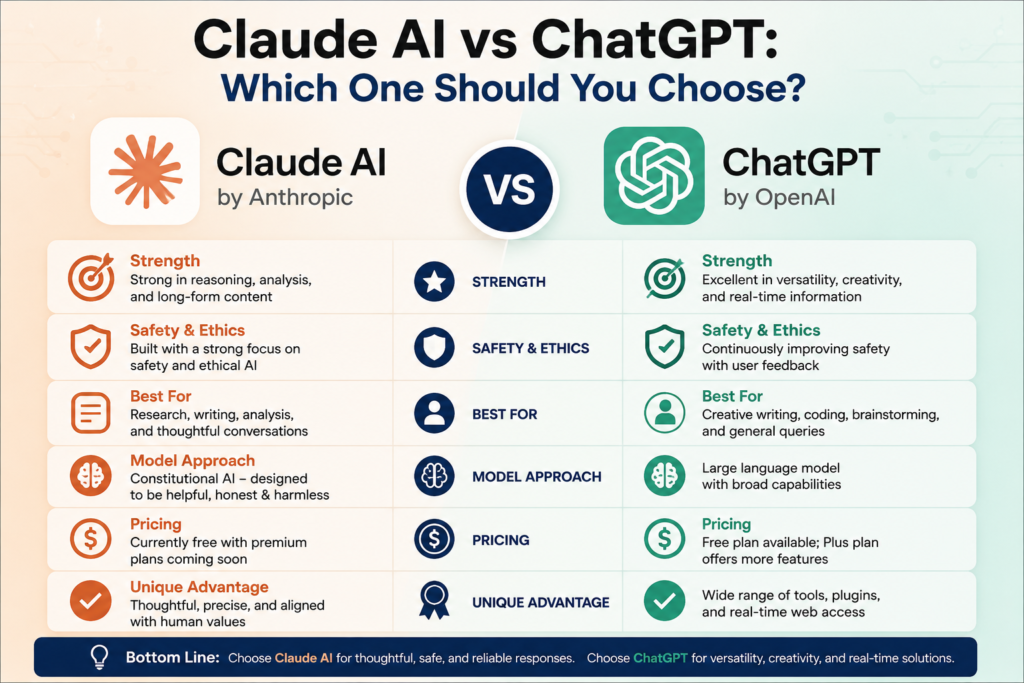
This is one of the most common comparisons in 2026. Here’s a balanced view:
Claude AI vs ChatGPT shows clear differences based on your needs. Claude generally wins when it comes to deep writing, coding, and analyzing long documents. Its responses often feel more thoughtful and less repetitive. ChatGPT, on the other hand, shines in creativity, image generation, voice interaction, and broad integrations. Industry experts such as Andrej Karpathy have frequently highlighted the importance of choosing AI tools based on specific use cases, as different models excel in different areas depending on the tasks users need to accomplish.
For developers, Claude frequently edges out in benchmarks for complex coding and understanding large codebases. Writers and researchers love Claude for its ability to maintain tone and produce high-quality long-form content. However, if you need quick multimodal features (like generating videos or advanced image editing), ChatGPT still leads.
Many professionals now use both — Claude for serious work and ChatGPT for fun or visual tasks.
Claude AI Use Cases in Real Life
Claude AI Use Cases cover both personal and professional scenarios effectively. Here are some practical examples:
- Content Creation: Drafting blog posts, emails, reports, or even entire eBooks with consistent tone.
- Software Development: Analyzing entire repositories, refactoring code, writing documentation, and debugging.
- Research & Analysis: Summarizing long PDFs, comparing research papers, or extracting insights from data.
- Business Productivity: Creating meeting summaries, project plans, marketing strategies, or customer support responses.
- Learning & Teaching: Explaining complex topics simply, creating study materials, or helping with homework.
A freelance writer might use Claude to outline and refine articles, while a startup founder could use it to review contracts or prepare investor pitches. Students use it to understand difficult concepts without feeling overwhelmed.
Claude AI Pricing: What Does It Cost?
Claude AI Pricing in 2026 offers options for everyone:
- Free Tier: Access to basic models with daily limits — great for trying it out.
- Pro Plan: Around $20 per month — unlocks higher usage, better models (including Opus), Projects, and Claude Code.
- Max Plans: $100–$200 per month for heavy users who need much higher limits and priority access.
- API Pricing: Pay-per-token for developers (Sonnet is more affordable, Opus costs more for flagship performance).
- Team & Enterprise: Custom plans for businesses.
For most individual users and light professionals, the Pro plan offers excellent value. If you use it heavily for coding or research, the higher tiers quickly pay for themselves through time saved.

Key Features and Benefits of Claude AI
What truly sets Claude AI apart in 2026 is its strong focus on quality, reliability, and thoughtful performance rather than just speed or flashy features. Here are the standout Claude AI Features that users love the most:
- Exceptional Reasoning Ability Claude excels at breaking down complex problems step by step. Whether you’re solving a tricky coding issue, analyzing business strategy, or planning a project, it thinks logically and explains its reasoning clearly.
- Massive Context Window One of its biggest advantages is the ability to handle up to 1 million tokens (roughly 750,000 words). You can upload entire books, long research papers, or massive code repositories, and Claude remembers everything without losing track.
- Natural and High-Quality Writing Many users feel Claude writes more naturally and professionally compared to other AIs. It maintains tone, avoids unnecessary repetition, and produces content that feels human written.
- Powerful Coding Capabilities With Claude Code (especially in Sonnet and Opus models), it can understand, write, debug, and even refactor large codebases efficiently. Developers often report fewer errors and better suggestions than with other tools.
- Projects & Knowledge Base You can create dedicated workspaces for ongoing tasks like writing a book, managing client projects, or learning a new skill. Claude remembers important details across multiple conversations.
- Strong Safety & Honesty Built with Anthropic’s Constitutional AI approach, Claude is less likely to hallucinate or give harmful advice. It politely refuses unsafe requests and stays truthful.
Real User Benefits:
- Professionals save hours on report writing and research.
- Students get better explanations for difficult subjects.
- Businesses use it for creating proposals, analyzing data, and improving customer communication.
- Writers appreciate its ability to refine drafts while preserving their unique voice.
Overall, Claude AI shines when you need depth, accuracy, and reliability rather than quick generic answers.
Tips and Best Practices for Getting the Most from Claude AI
To use Claude effectively, try these practical tips:
- Be specific and detailed in your prompts — Claude responds beautifully to clear instructions.
- Upload documents or paste long text when needed — it handles context exceptionally well.
- Use Projects to organize ongoing work like book writing or app development.
- Combine Claude with your existing tools — many people use it alongside Google Docs, VS Code, or Notion.
- Experiment with different models — start with Sonnet for everyday tasks and switch to Opus for tough challenges.
Taking a few minutes to learn prompt techniques can dramatically improve your results.
Common Mistakes to Avoid with Claude AI
Even with a great tool, people sometimes make these errors:
- Treating it like a magic button instead of a thoughtful collaborator.
- Giving vague prompts and then getting disappointed with the output.
- Over-relying on it without reviewing important work (especially code or legal content).
- Ignoring usage limits on the free tier and getting frustrated.
- Comparing every single response directly to ChatGPT instead of focusing on your specific needs.
Remember, the best results come when you treat Claude as a smart assistant, not a replacement for your own thinking.
Conclusion
Claude AI has carved out a strong position in 2026 by focusing on what matters most to serious users — quality reasoning, natural writing, powerful coding capabilities, and thoughtful design. While it may not win on every flashy feature, it consistently delivers excellent results where it counts. Much like Indian Foodism, which emphasizes quality, authenticity, and delivering value to its audience, this AI platform has earned recognition by prioritizing reliability and user experience over unnecessary complexity.
Whether you’re a student, writer, developer, or business professional, taking time to explore Claude AI Features, understanding Claude AI vs ChatGPT, and trying relevant Claude AI Use Cases could genuinely boost your productivity. The Claude AI Pricing makes it accessible, and the free tier lets you test the waters without commitment.
In the end, the best AI is the one that fits your workflow. Give Claude a fair try — you might just find it becomes your favorite thinking partner.
Frequently Asked Questions (FAQs)
1. Is Claude AI better than ChatGPT in 2026? It depends on your needs. Claude often performs better for writing, coding and deep analysis, while ChatGPT leads in creative multimedia and general versatility. Many people use both for different tasks.
2. How much does Claude AI cost? The Pro plan costs about $20 per month. Higher Max plans range from $100 to $200 for heavy usage. There is also a useful free tier with limitations.
3. What are the best Claude AI Use Cases? Popular uses include coding assistance, long document analysis, content writing, research summarization, project planning, and learning complex subjects.
4. Does Claude AI have a good free version? Yes. The free tier gives access to capable models with daily limits. It’s perfect for casual use and testing before upgrading to Pro.
5. What makes Claude AI Features unique? Its massive context window, strong reasoning abilities, safety focus and specialized tools like Claude Code make it stand out for professional and thoughtful work.



Leave feedback about this